Authentication
Django Ninja lets you attach authentication to an operation, a router, or
the whole API with a single auth= argument, without having to hand-roll the
various security schemes yourself.
Basic usage
Pass auth= to an operation decorator. Here, requests are authenticated
using Django's session framework (the default cookie-based login):
from ninja import NinjaAPI
from ninja.security import django_auth

api = NinjaAPI()


@api.get("/pets", auth=django_auth)
def pets(request):
    return f"Authenticated user {request.auth}"
auth accepts any callable that takes request and returns a value:
- If the return value is truthy, it's assigned to
request.authand the operation runs. - If it's falsy (or
None), Django Ninja returns an HTTP 401{"detail": "Unauthorized"}response and the operation never runs.
Everything below — API keys, HTTP Bearer/Basic, sessions — is just a ready-made class implementing that same protocol, plus a bit of OpenAPI metadata so the interactive docs know how to prompt for credentials.
Built-in authenticators
API key
An API key is a token the client sends with each request to identify itself — in the query string, a header, or a cookie:
GET /something?api_key=abcdef12345           # APIKeyQuery
GET /something HTTP/1.1
X-API-Key: abcdef12345                        # APIKeyHeader
Cookie: api_key=abcdef12345                    # APIKeyCookie
Subclass APIKeyQuery, APIKeyHeader or APIKeyCookie (from
ninja.security) and implement authenticate(self, request, key),
returning whatever should become request.auth (or None/falsy to reject):
param_name is the name of the query parameter, header, or cookie to read
the key from — it defaults to "key" on all three classes.
Note
APIKeyCookie (and anything built on it, including django_auth below)
also runs a CSRF check by default, since cookies are sent automatically
by the browser. Pass csrf=False to a subclass's __init__ to disable
it. See CSRF for the full picture.
HTTP Bearer
Subclass HttpBearer and implement authenticate(self, request, token).
The client sends Authorization: Bearer <token>:
from ninja.security import HttpBearer


class AuthBearer(HttpBearer):
    def authenticate(self, request, token):
        if token == "supersecret":
            return token


@api.get("/bearer", auth=AuthBearer())
def bearer(request):
    return {"token": request.auth}
The Authorization header must use the Bearer scheme (case-insensitive)
followed by the token; anything else (missing header, wrong scheme, no
token) is treated as unauthenticated rather than an error, so a later
authenticator in a multiple-authenticators list
still gets a chance to run.
HTTP Basic Auth
Subclass HttpBasicAuth and implement
authenticate(self, request, username, password):
from ninja.security import HttpBasicAuth


class BasicAuth(HttpBasicAuth):
    def authenticate(self, request, username, password):
        if username == "admin" and password == "secret":
            return username


@api.get("/basic", auth=BasicAuth())
def basic(request):
    return {"httpuser": request.auth}
Django session authentication
ninja.security ships three ready-to-use instances built on Django's
session framework (they read the session cookie named by
settings.SESSION_COOKIE_NAME and check request.user):
| Instance | Grants access to |
|---|---|
django_auth |
any authenticated user |
django_auth_superuser |
superusers only |
django_auth_is_staff |
superusers and staff members |
from ninja import NinjaAPI
from ninja.security import django_auth_superuser

api = NinjaAPI()


@api.get("/admin-only", auth=django_auth_superuser)
def admin_view(request):
    return {"message": f"Hello superuser {request.auth}"}
Each instance is backed by a class of the same shape —
SessionAuth, SessionAuthSuperUser, SessionAuthIsStaff — in case you
need to subclass one, e.g. to add extra checks.
Custom function-based authentication
Any plain function works too — Django Ninja doesn't require you to subclass anything. This is handy for one-off checks like an IP allow-list:
def ip_whitelist(request):
    if request.META.get("REMOTE_ADDR") == "8.8.8.8":
        return "8.8.8.8"


@api.get("/ipwhitelist", auth=ip_whitelist)
def ipwhitelist(request):
    return f"Authenticated client, IP = {request.auth}"
Multiple authenticators
Pass a list to auth= to accept any one of several schemes. They're tried
in order; the first one to return a truthy value wins, and if none does,
the request is rejected:
from ninja.security import APIKeyHeader, APIKeyQuery


class AuthCheck:
    def authenticate(self, request, key):
        if key == "supersecret":
            return key


class QueryKey(AuthCheck, APIKeyQuery):
    pass


class HeaderKey(AuthCheck, APIKeyHeader):
    pass


@api.get("/multiple", auth=[QueryKey(), HeaderKey()])
def multiple(request):
    return f"Token = {request.auth}"
Applying auth at different levels
auth can be set on the API, a router, or an individual operation. The most
specific setting wins — an operation's auth= overrides its router's, which
overrides the NinjaAPI's:
from ninja import NinjaAPI, Router
from ninja.security import django_auth, HttpBearer

api = NinjaAPI(auth=django_auth)  # applies to every operation by default

router = Router()


@router.get("/public")  # still uses django_auth, inherited from the API
def public(request):
    return {"ok": True}


@router.get("/open", auth=None)  # explicitly disables auth for this operation
def open_endpoint(request):
    return {"ok": True}


api.add_router("/items/", router)
A Router can set its own default too, either in its constructor or when
mounting it, and that overrides the API-level auth for every operation in
that router:
router = Router(auth=AuthBearer())
# or:
api.add_router("/events/", events_router, auth=AuthBearer())
Pass auth=None explicitly (on an operation, a router, or when adding a
router) to opt that scope out of whatever auth would otherwise be
inherited — it's the only way to turn auth off for part of an API that
sets it globally.
Authorization and permissions
Authentication identifies who's calling; what they're allowed to do is up
to you. Once authenticated, request.auth holds whatever the authenticator
returned (a Django User for django_auth, a token, an API-key object,
...), so a permission check is just a plain condition on it:
from ninja import NinjaAPI
from ninja.security import django_auth

api = NinjaAPI(auth=django_auth)


@api.get("/admin")
def admin_view(request):
    if not request.auth.is_staff:
        return api.create_response(request, {"detail": "Forbidden"}, status=403)
    return {"message": "Welcome!"}
For a reusable version of this check that you can stack on many operations,
see Decorators. For the exception-based version
(raise HttpError(403, ...) or AuthorizationError), see
Errors & Exception Handling.
Raising exceptions from authenticate()
An exception raised inside authenticate() is handled the same way as one
raised inside the operation itself — if you've registered a handler for it
with @api.exception_handler, that handler builds the response:
from ninja import NinjaAPI
from ninja.security import HttpBearer

api = NinjaAPI()


class InvalidToken(Exception):
    pass


@api.exception_handler(InvalidToken)
def on_invalid_token(request, exc):
    return api.create_response(request, {"detail": "Invalid token supplied"}, status=401)


class AuthBearer(HttpBearer):
    def authenticate(self, request, token):
        if token == "supersecret":
            return token
        raise InvalidToken


@api.get("/bearer", auth=AuthBearer())
def bearer(request):
    return {"token": request.auth}
See Errors & Exception Handling for more on exception handlers.
Async authentication
Authentication works the same way for async operations, and an
authenticator can itself be async — Django Ninja detects an
async def authenticate (or an async function passed directly to auth=)
and awaits it correctly whether the operation itself is sync or async.
A plain async function:
async def async_auth(request):
    return request.headers.get("X-Token") == "supersecret"


@api.get("/pets", auth=async_auth)
async def pets(request):
    return {"user": request.auth}
Or an async authenticate() method on any of the classes above:
from ninja.security import HttpBearer


class AsyncBearer(HttpBearer):
    async def authenticate(self, request, token):
        # e.g. an async database or cache lookup
        return token if token == "supersecret" else None


@api.get("/async-bearer", auth=AsyncBearer())
async def async_bearer(request):
    return {"token": request.auth}
Interactive docs
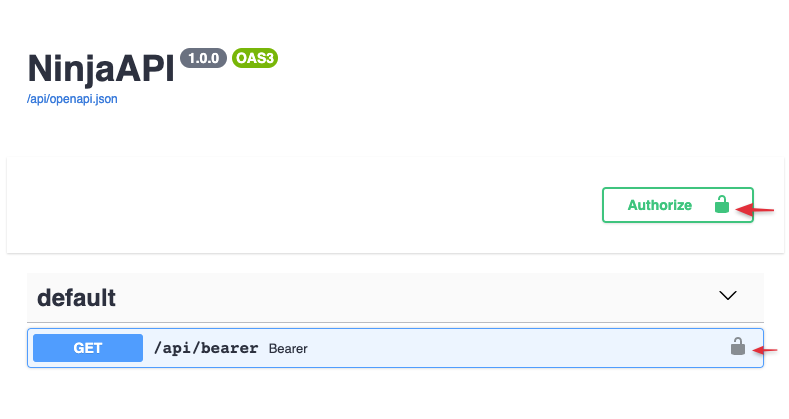
Whatever auth= an operation uses is reflected in the generated OpenAPI
schema as a security requirement, so the interactive docs at /api/docs
show an Authorize button for entering credentials:
Clicking it prompts for the right kind of credential for the schemes in use (a bearer token, an API key, basic-auth credentials, ...):
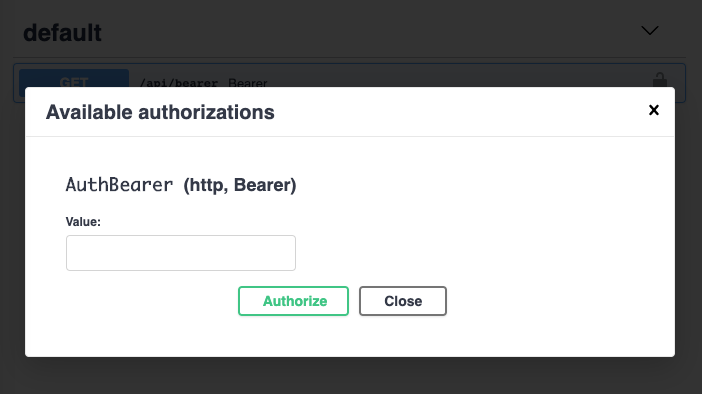
Once entered, Swagger UI attaches it to every request you try from the docs page. See OpenAPI & Interactive Docs for more.