Path Parameters
You declare path parameters using the same {...} syntax as Python format
strings — which conveniently also matches how
OpenAPI describes path parameters.
Django Ninja reads your view's type hints to parse, validate and document
each one automatically.
Declaring a path parameter
Add a {name} placeholder to the path and a matching argument to your function:
The value captured from the URL is passed to your function as item_id. A
request to /items/foo returns:
Since item_id has no type annotation, it defaults to str.
Type conversion and validation
Annotate the argument with a standard Python type to get automatic parsing and validation:
A request to /items/3 now returns {"item_id": 3} — a Python int, not the
string "3".
If the value can't be converted, Django Ninja returns a 422 error
describing the problem instead of calling your view:
{
    "detail": [
        {
            "type": "int_parsing",
            "loc": ["path", "item_id"],
            "msg": "Input should be a valid integer, unable to parse string as an integer"
        }
    ]
}
Path parameters are always required
Because a path parameter is part of the URL, it can't have a default value — declaring one raises an error when the app starts. If a field is genuinely optional, make it a query parameter instead.
Django path converters
You can also use Django's path converters
directly in the path — str, int, slug, uuid and path:
With a converter, Django itself rejects non-matching URLs before your view is
even reached — if item_id isn't a valid int, the route doesn't match at
all (resulting in a 404, or a 422 from another matching route) rather than
returning a validation error.
Tip
A converter narrows which URLs match, but doesn't change the argument's
Python type by itself — an unannotated argument is still treated as
str. Since the int converter has already turned the value into a
Python int before Django Ninja sees it, that mismatch fails
validation with a 422 error instead of calling your view. Annotate the
argument to match the converter:
The uuid converter
Django's built-in uuid converter normally returns a UUID object.
Django Ninja rewrites {uuid:...} to a custom {uuidstr:...}
converter under the hood, so your view always receives a plain str and
lets Pydantic (or your own annotation) handle any further conversion.
Path parameters with slashes
The path converter matches the rest of the URL, slashes included:
A request to /dir/some/path/with-slashes returns value equal to
"some/path/with-slashes".
Multiple parameters
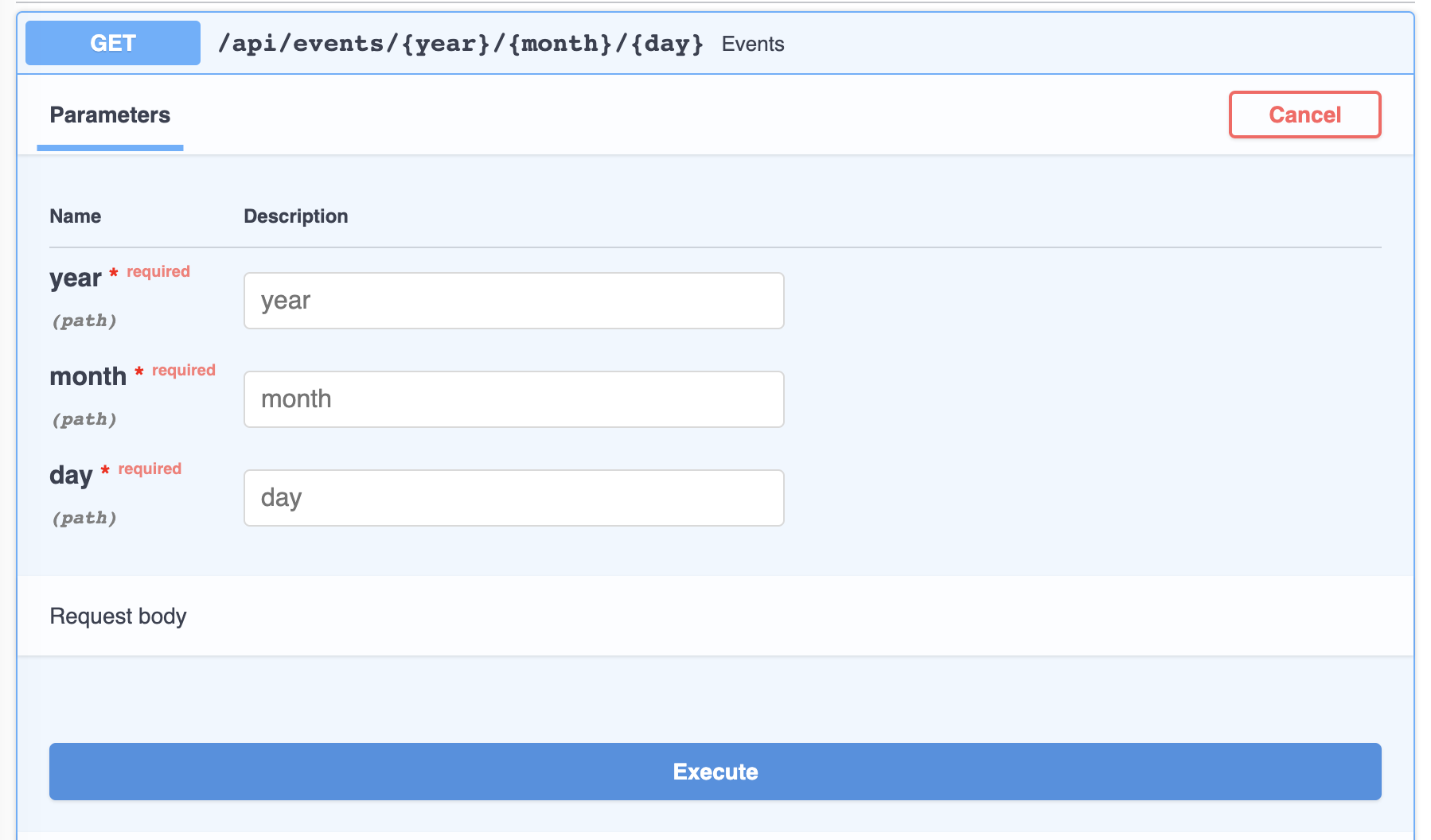
Declare as many path parameters as you need — just give each one a unique name that also appears in the function signature:
@api.get("/events/{year}/{month}/{day}")
def events(request, year: int, month: int, day: int):
    return {"date": [year, month, day]}
Extra validation with Path
For constraints beyond a plain type — numeric ranges, string length, a regex
pattern — annotate the argument with ninja.Path(...) instead of (or in
addition to) a type:
from ninja import NinjaAPI, Path

api = NinjaAPI()


@api.get("/items/{item_id}")
def read_item(request, item_id: int = Path(..., gt=0, le=1000)):
    return {"item_id": item_id}
Path accepts the same options as Query: alias,
title, description, gt / ge / lt / le, min_length, max_length,
pattern, example, examples, deprecated and include_in_schema, plus
any extra keyword Pydantic's Field understands.
Grouping parameters in a schema
When several path parameters belong together — and especially when they need
to be validated as a group — encapsulate them in a Schema and annotate the
argument with Path[...]:
import datetime

from ninja import NinjaAPI, Path, Schema

api = NinjaAPI()


class EventDate(Schema):
    year: int
    month: int
    day: int

    def value(self) -> datetime.date:
        return datetime.date(self.year, self.month, self.day)


@api.get("/events/{year}/{month}/{day}")
def events(request, date: Path[EventDate]):
    return {"date": date.value()}
Every field on the schema must correspond to a {placeholder} in the path —
Django Ninja warns at startup if any path placeholder has no matching
field.
Note
Nested path parameters work the same way as nested query
parameters — a schema field can itself be another
Schema, as long as every leaf field maps back to a name in the path.
Path parameters from a router prefix
A Router mounted under a prefix that contains its own
{placeholders} can read them the same way, even though they aren't part of
the operation's own path string:
from ninja import NinjaAPI, Path, Router

api = NinjaAPI()
router = Router()


@router.get("/multiply/{c}")
def multiply(request, c: int, a: int = Path(...), b: int = Path(...)):
    return {"result": (a + b) * c}


api.add_router("add/{a}/{b}", router)
Here a and b come from the router's mount prefix (add/{a}/{b}), not from
/multiply/{c} itself. See Nested URL parameters
for the full example.
Interactive docs
Path parameters show up in the interactive docs with their type and any validation you've declared: