OpenAPI & Interactive Docs
Every NinjaAPI generates an OpenAPI schema from
your operations and schemas, and serves it alongside an interactive docs UI you can
browse, try requests from, and share with API consumers. This page covers configuring,
customizing, securing and exporting that schema and UI. For the operation-level options
that feed into the schema (tags, deprecated, per-operation openapi_extra,
include_in_schema, ...), see Operations.
The docs UI
By default, once you've mounted your API, two URLs are registered under it:
/openapi.json— the raw OpenAPI schema, served atopenapi_url./docs— an interactive docs UI that renders that schema, served atdocs_url.
from ninja import NinjaAPI

api = NinjaAPI()


@api.get("/hello")
def hello(request):
    return "Hello world"
Start the dev server and open /api/docs to try it:
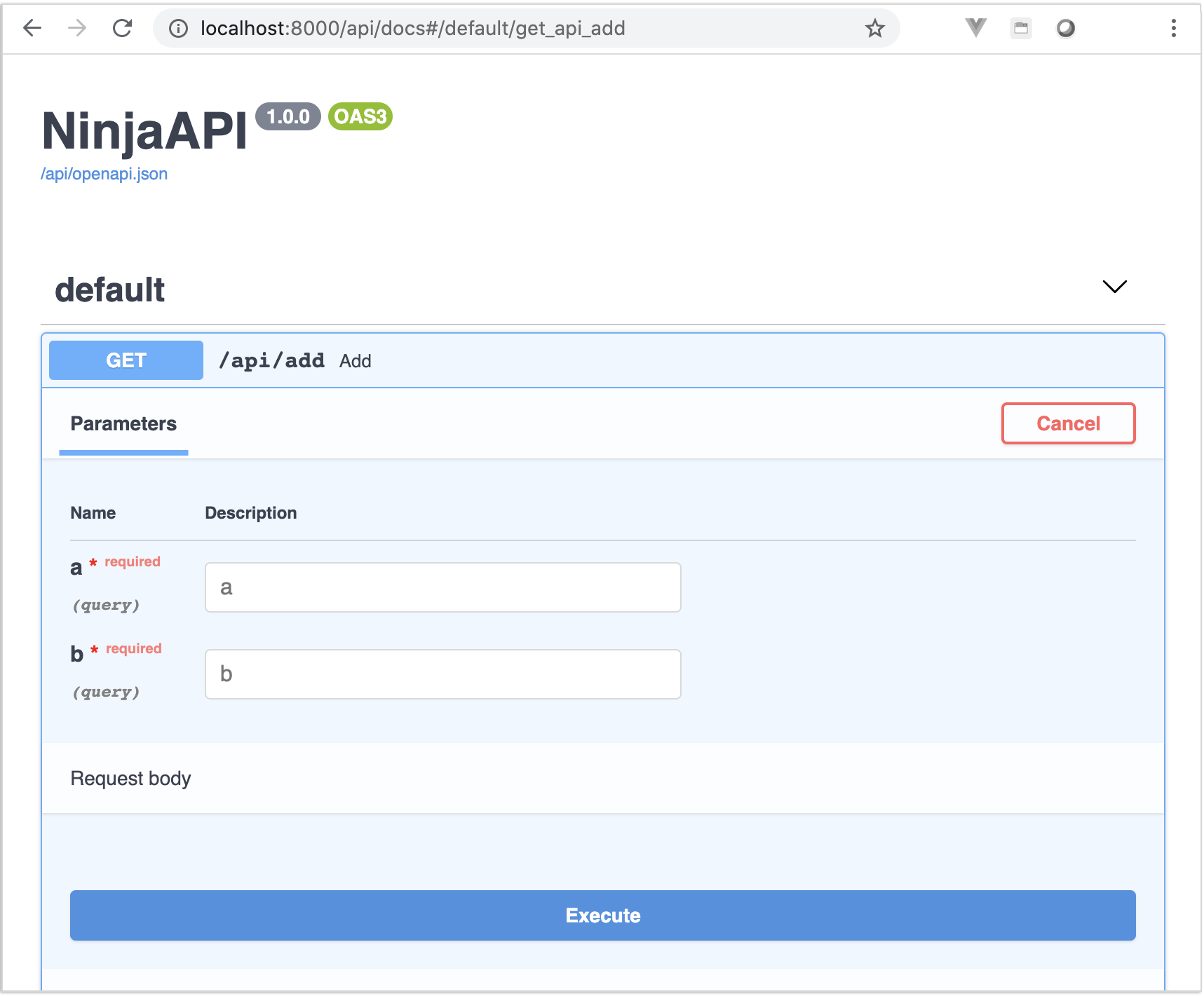
By default this UI is built with Swagger UI,
configured via the docs argument's Swagger instance.
Switching to Redoc
Pass a Redoc instance to docs to use Redoc
instead of Swagger UI:
Swagger and Redoc are both subclasses of ninja.openapi.docs.DocsBase — see
Custom docs viewer below to write your own.
Docs UI settings
Both Swagger and Redoc take a settings dict, merged over their (small) set of
defaults, and forwarded straight to the underlying JS library:
from ninja import NinjaAPI, Redoc, Swagger

api = NinjaAPI(docs=Swagger(settings={"persistAuthorization": True}))

# or
api = NinjaAPI(docs=Redoc(settings={"disableSearch": True}))
Swagger's own defaults are {"layout": "BaseLayout", "deepLinking": True}; Redoc
has none. See each project's docs for the full list of options:
CDN vs local static files
The docs UI needs its own JS/CSS assets (the Swagger UI or Redoc bundle). Django
Ninja doesn't require ninja to be in INSTALLED_APPS — by default those assets are
loaded from a CDN, so the docs work out of the box.
Add "ninja" to INSTALLED_APPS to serve them from your own server instead, through
Django's regular staticfiles mechanism:
This matters if requests to the CDN are blocked (offline development, a strict CSP, an airgapped deployment) or you'd rather not depend on a third party in production.
Hiding or disabling the docs
docs_url and openapi_url can each be set to None independently:
| Configuration | /openapi.json |
/docs |
Use case |
|---|---|---|---|
| default | available | available | development |
docs_url=None |
available | hidden | hide the UI, keep the schema for clients/codegen |
openapi_url=None |
hidden | hidden | disable documentation entirely |
Since the docs UI is generated from the schema, disabling openapi_url disables
docs_url too, regardless of what it's set to — no documentation URLs get registered
at all.
Note
openapi_url and docs_url must be different from each other — Django Ninja
raises an AssertionError at startup otherwise.
Protecting the docs
Both /openapi.json and /docs are plain Django views, wrapped in docs_decorator
when one is given — apply Django's own auth decorators, or anything else that returns
a view function:
from django.contrib.admin.views.decorators import staff_member_required
from ninja import NinjaAPI

api = NinjaAPI(docs_decorator=staff_member_required)
CSRF-protected auth in the docs UI
When one of your auth classes requires CSRF (its csrf attribute is True — see
Authentication), Swagger UI's page is rendered with the current
CSRF token and configured to send it as X-CSRFToken on every request you try from
/docs, so session-authenticated, CSRF-protected operations can still be exercised
from the interactive docs:
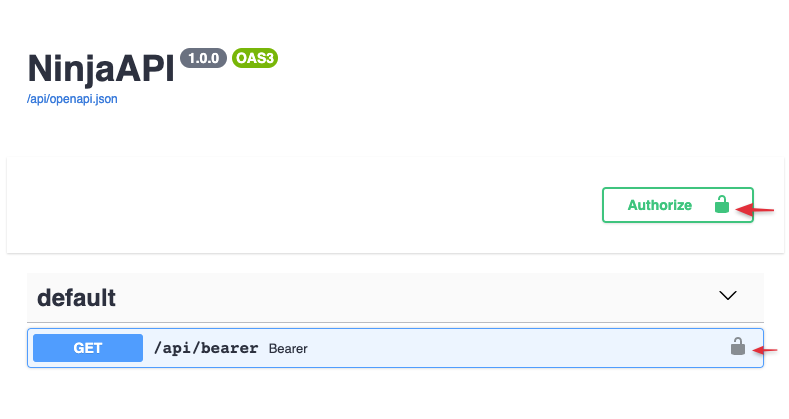
This only applies to Swagger; Redoc has no "try it out" request runner. See
CSRF for the full picture.
Extending the OpenAPI schema
Set openapi_extra on NinjaAPI to merge arbitrary keys into the top-level schema —
useful for fields Django Ninja doesn't expose an argument for, like info.termsOfService
or a custom x- extension:
api = NinjaAPI(
    title="Demo API",
    openapi_extra={
        "info": {
            "termsOfService": "https://example.com/terms/",
        },
    },
)
openapi_extra is also available per-operation, to merge keys into a single
operation's schema entry (extra responses, a hand-written requestBody, ...) — see
openapi_extra in the Operations guide.
Reversing the docs URL
The docs view is registered under the name openapi-view, namespaced like any other
operation, so it can be reversed with Django's reverse():
or from a template:
The namespace defaults to f"api-{version}" — pass urls_namespace to NinjaAPI to
override it. See URLs & Reverse for reversing individual operations.
Custom docs viewer
To render the docs page yourself, subclass DocsBase and implement render_page:
from django.http import HttpRequest, HttpResponse
from ninja import NinjaAPI
from ninja.openapi.docs import DocsBase


class MyDocsViewer(DocsBase):
    def render_page(self, request: HttpRequest, api: NinjaAPI, **kwargs) -> HttpResponse:
        return HttpResponse("my custom docs page")


api = NinjaAPI(docs=MyDocsViewer())
render_page receives the current request and the api instance — use
self.get_openapi_url(api, kwargs) (as Swagger and Redoc do) to build the URL of
the JSON schema to render against.
Custom favicon
The docs UI ships with a default favicon (the ninja star). To replace it, add
"ninja" to INSTALLED_APPS (see CDN vs local static files)
and override the ninja/favicons.html template:
<!-- templates/ninja/favicons.html -->
{% load static %}

{% block favicons %}
    <link rel="icon" type="image/png" href="{% static 'path/to/your/favicon.png' %}">
{% endblock %}
See the Django documentation on overriding templates for how template resolution order works.
Exporting the schema
The export_openapi_schema management command writes the schema to stdout, or to a
file, without needing a running server. Like any Django management command, it's only
discovered once "ninja" is in INSTALLED_APPS:
| Option | Description |
|---|---|
--api |
Dotted path to the NinjaAPI instance to export. Defaults to the one mounted at /api/. |
--output |
File to write the schema to. Defaults to stdout. |
--indent |
JSON indent level. |
--sorted |
Sort JSON keys. |
--ensure-ascii |
Escape non-ASCII characters in the output. |
Without --api, the command resolves /api/ to find your NinjaAPI instance and
fails with a clear error if none is mounted there — pass --api explicitly whenever
your API is mounted somewhere else, or you have more than one.
This is handy in CI, to catch accidental breaking changes to the schema, or to feed the schema to an external code generator without spinning up the app.