Routers
A real application rarely fits into a single file. Router lets you split your API
into modules — typically one per Django app — and combine them under a single
NinjaAPI instance.
Basic usage
A typical layout has one Router per Django app, each in its own api.py, plus a
project-level api.py that combines them:
myproject/
├── api.py
└── settings.py
events/
├── api.py
└── models.py
news/
├── api.py
└── models.py
blogs/
├── api.py
└── models.py
manage.py
Instead of registering operations on the NinjaAPI instance directly, register them
on a Router:
# events/api.py
from ninja import Router
from .models import Event

router = Router()


@router.get("/")
def list_events(request):
    return [{"id": e.id, "title": e.title} for e in Event.objects.all()]


@router.get("/{event_id}")
def event_details(request, event_id: int):
    event = Event.objects.get(id=event_id)
    return {"title": event.title, "details": event.details}
news/api.py and blogs/api.py follow the same pattern. Router supports the same
.get(), .post(), .put(), .patch(), .delete() and .api_operation() methods
as NinjaAPI — see Operations for the full set of options each one
takes.
Then, in your project-level api.py, import the routers and mount each one with
add_router():
from ninja import NinjaAPI
from events.api import router as events_router

api = NinjaAPI()

api.add_router("/events/", events_router)      # by object
api.add_router("/news/", "news.api.router")    # or by Python import path
api.add_router("/blogs/", "blogs.api.router")
Passing a dotted string instead of the object itself avoids importing the app's api
module (and therefore its models) at the top of your project's api.py — handy for
avoiding circular imports.
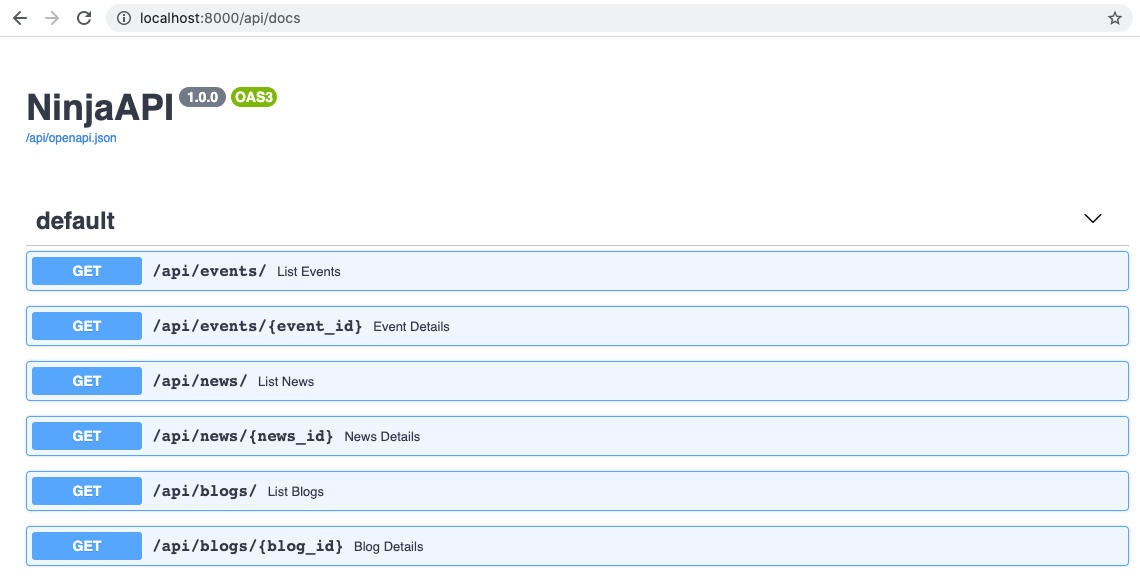
Everything registered on events_router now lives under /api/events/. Open
/api/docs and all three routers show up combined into a single schema:
Router constructor options
All arguments are keyword-only, and each one is a default that individual operations can override:
| Argument | Type | Default | Description |
|---|---|---|---|
auth |
callable, sequence of callables, or None |
NOT_SET |
Default authentication for every operation in this router. See Authentication. |
throttle |
throttle instance or list of instances | NOT_SET |
Default throttling for every operation in this router. See Throttling. |
tags |
list[str] \| None |
None |
Default OpenAPI tags for every operation in this router. |
by_alias |
bool \| None |
None |
Default by_alias for response serialization. See Schema Configuration. |
exclude_unset |
bool \| None |
None |
Default exclude_unset for response serialization. |
exclude_defaults |
bool \| None |
None |
Default exclude_defaults for response serialization. |
exclude_none |
bool \| None |
None |
Default exclude_none for response serialization. |
Router-level authentication
Apply an authenticator to every operation in a router, either on the constructor:
or when mounting it:
The effective auth for an operation is resolved with this priority: the operation's
own auth= argument, then the auth passed to add_router(), then the Router's
own auth, then whatever the router inherited from a parent router (see
Nested routers below), and finally NinjaAPI(auth=...).
Throttling works the same way — Router(throttle=...) or
add_router(..., throttle=...) — with the same override priority. See
Throttling.
Router tags
Set a default OpenAPI tag for every operation declared on a router:
or override it for a specific mount:
Tags passed to add_router() replace the router's own tags for that mount rather
than merging with them. Tags set on the Router itself, on the other hand,
accumulate with tags inherited from a parent router when the router is nested. An
operation's own tags= argument always wins over both.
Nested routers
A Router can mount another Router, exactly like an API does, letting you split
logic into as many levels as you need. Call add_router() on the router instance
instead of the api instance, then mount the top-level router into api as usual:
from ninja import NinjaAPI, Router

api = NinjaAPI()

first_router = Router()
second_router = Router()
third_router = Router()


@api.get("/add")
def add(request, a: int, b: int):
    return {"result": a + b}


@first_router.get("/add")
def add(request, a: int, b: int):
    return {"result": a + b}


@second_router.get("/add")
def add(request, a: int, b: int):
    return {"result": a + b}


@third_router.get("/add")
def add(request, a: int, b: int):
    return {"result": a + b}


second_router.add_router("l3", third_router)
first_router.add_router("l2", second_router)
api.add_router("l1", first_router)
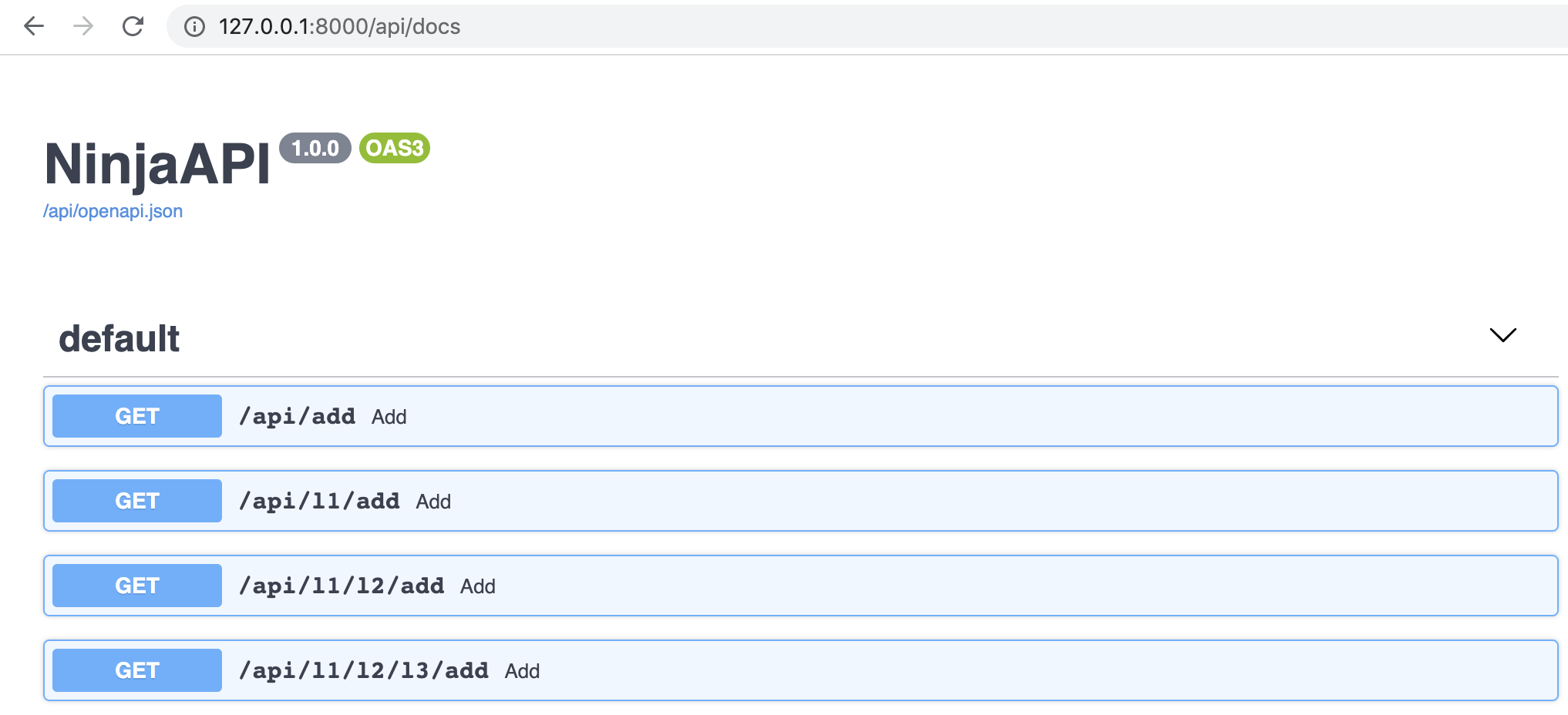
This produces:
auth, throttle and tags set on a parent router flow down to every router
nested inside it, unless a child router (or an individual operation) overrides them.
Nested URL parameters
Path parameters from the parent's mount prefix are available to operations in the
nested router by declaring them with Path:
from ninja import NinjaAPI, Path, Router

api = NinjaAPI()
router = Router()


@api.get("/add/{a}/{b}")
def add(request, a: int, b: int):
    return {"result": a + b}


@router.get("/multiply/{c}")
def multiply(request, c: int, a: int = Path(...), b: int = Path(...)):
    return {"result": (a + b) * c}


api.add_router("add/{a}/{b}", router)
which generates:
Mounting the same router twice
Mounting the same Router instance more than once raises a ConfigError unless
each extra mount gets a unique url_name_prefix, since operation url_names must
be unique within a Django URL namespace:
api.add_router("/v1/things/", things_router)
api.add_router("/v2/things/", things_router, url_name_prefix="things_v2")
See URLs & Reverse for how url_name and namespaces work.
Decorators
router.add_decorator() wraps every operation in the router with a plain Python
decorator, without changing its signature checks. See Decorators.
Auto-paginated routers
RouterPaginated, from ninja.pagination, is a Router subclass that automatically
applies your default pagination class to every operation whose response is a
collection type (e.g. response=list[Something]), so you don't need @paginate on
each one. See Pagination for details and configuration.
Tips
- Each mount clones the router's operations, so the same
Routerinstance can be mounted more than once (with a distincturl_name_prefixper extra mount) without the mounts affecting each other. - Routers freeze the first time Django needs their URL patterns — in practice, the
first time
api.urlsis accessed. Add all operations and call everyadd_router()before that point; adding to a frozen router raisesConfigError. default_routeronNinjaAPIis just theRouterthat@api.get()and friends register onto — pass your own (e.g. aRouterPaginated()) toNinjaAPI(default_router=...)to make every directly-registered operation paginated by default.